
Automated bank statement analysis helps lenders streamline underwriting by extracting financial data, checking transaction accuracy, identifying suspicious PDF modifications, and preparing structured reports for loan decisions. Instead of manually reviewing every page, underwriters can use automated tools to process statements, assess cash flow, and flag documents that need further investigation.
For small business lenders, merchant cash advance (MCA) providers, banks, and alternative finance companies, this approach can reduce repetitive work while improving the consistency of financial reviews. However, choosing the right software matters. A good solution should do more than extract transaction data; it should also detect document manipulation, integrate with existing loan origination systems (LOS), and give underwriters clear evidence to support their decisions.
Why Are Lenders Moving Towards Automated Bank Statement Analysis?
Traditional underwriting often involves opening multiple PDF statements, checking deposits, calculating monthly revenue, reviewing ending balances, and comparing transactions across different periods. This process takes time, especially when borrowers submit statements from several banks or provide large, poorly organized files.
Automated bank statement analysis addresses these problems by handling repetitive document-processing tasks and presenting the results in a structured format.
The main benefits include:
- Faster processing: Extract transaction information without manually entering every figure.
- Better fraud detection: Identify suspicious PDF edits, inconsistent balances, and unusual document structures.
- Consistent financial reviews: Apply the same calculations and checks across applications.
- Improved productivity: Allow underwriters to focus on complex applications instead of routine data entry.
- Better cash flow visibility: Review revenue, expenses, deposits, and existing debt obligations together.
Automation does not remove the need for human judgment. It helps underwriting teams identify which applications can move forward and which require additional verification.
What Are the Best Tools to Catch Doctored Bank Statements?
Detecting doctored bank statements requires more than standard OCR (optical character recognition). OCR extracts text from a document, but it does not necessarily establish whether that information is genuine.
A fraud detection solution should examine the PDF's internal structure, metadata, fonts, transaction calculations, and visual consistency. It should also compare financial figures to identify discrepancies that could indicate manipulation.
MoneyThumb Thumbprint uses its patented PDF fraud detection methodology to identify altered balances, duplicated transactions, inconsistent fonts, and formatting differences. It compares document characteristics against patterns from previously processed statements.
The important point is that no single fraud signal should automatically result in a loan rejection. A legitimate statement may contain unusual formatting because of scanning, conversion, or changes in the bank's document template. Underwriters should review the evidence before making a final decision.
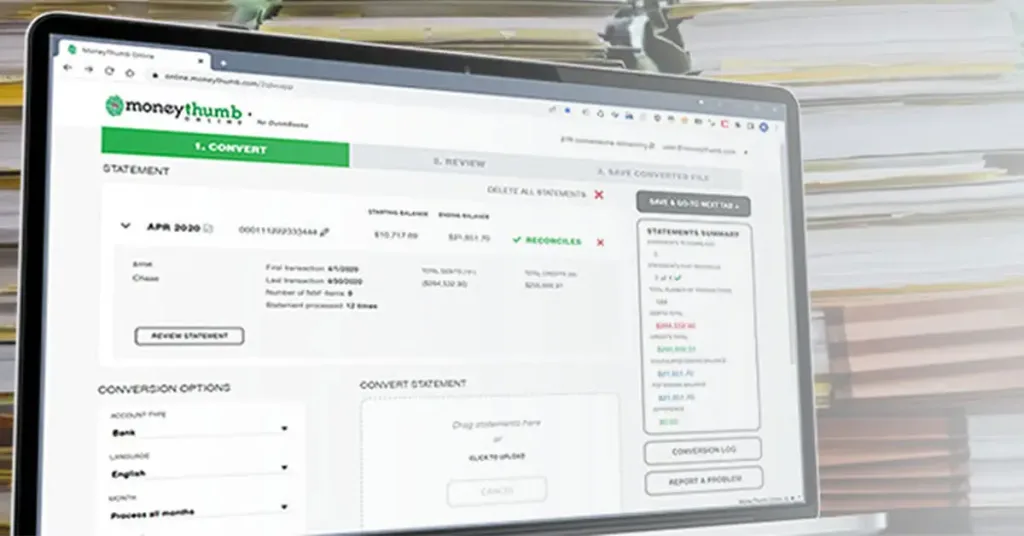
MoneyThumb focuses on converting financial documents into structured data and providing fraud detection through its Thumbprint technology. Its platform supports transaction extraction, reconciliation, cash flow analysis, transaction categorization, and customizable underwriting scorecards. Lenders can receive results in JSON, Excel, or CSV formats.
MoneyThumb publishes an entry price starting at $599.95 per year for its API platform. Its pricing information also describes consumption-based conversion bundles, with costs depending on document volume and selected services. Lenders should confirm the applicable plan before budgeting.
MoneyThumb provides more public pricing information. Its pricing documentation explains that monthly bank statements count as conversions, while repeat processing of the same statement does not incur another conversion charge under its stated terms. Heron requires lenders to discuss their requirements and request a quote.
What Should a Mid-Volume Lending Operation Budget For?
A lender processing around 1,000–5,000 applications monthly should request a detailed quotation based on its actual processing needs.
The following cost areas should be considered:
- Document processing and monthly conversion charges.
- Fraud detection and forensic analysis.
- API access and integration development.
- Custom underwriting rules and reporting.
- Testing, training, and ongoing technical support.
Do not assume that the lowest document-processing price will produce the lowest total operating cost. A platform that reduces manual work and catches suspicious submissions earlier may provide greater financial value over time.
How Long Does Integration With an Existing LOS Take?
Integration time depends on the lender's current technology, API availability, security requirements, and the amount of customization needed.
A simple API connection is generally easier than a complete workflow involving document intake, automated fraud screening, custom scorecards, and automatic updates to the loan origination system.
The following are practical project-planning estimates for a mid-volume lending operation, not published implementation commitments from the vendors.
| Implementation stage | Estimated time |
| Requirements and workflow review | 1–2 weeks |
| API configuration and development | 2–4 weeks |
| LOS/CRM mapping and data testing | 1–3 weeks |
| Fraud testing and underwriting validation | 1–2 weeks |
| Staff training and production launch | 1 week |
A straightforward integration may take approximately 3–5 weeks, while a more customized implementation may require 6–12 weeks or longer. Before selecting a provider, lenders should ask whether the platform supports their current LOS, whether webhooks are available, which data fields can be returned, and whether the provider offers technical assistance during implementation.
How Are Advanced PDF Forensics Changing Fraud Detection in Commercial Lending?
Traditional document verification often focuses on checking the information visible on a bank statement. However, a PDF can look genuine while containing hidden modifications.
For example, a borrower might change a monthly deposit from $8,500 to $18,500, adjust an ending balance, or insert transactions that never occurred. These changes may be difficult to identify through a quick visual review.
Advanced PDF forensics examines the technical structure of a document to identify signs of manipulation.
Five PDF Forensic Checks Every Lender Should Consider
1. Metadata analysis
PDF metadata can contain creation dates, modification dates, software information, and other file properties. Unexpected changes or unusual editing histories may indicate that a document has been modified.
2. Font and text analysis
A genuine statement usually follows consistent formatting. If a borrower changes a transaction amount, the inserted text may use a different font, size, or rendering method.
3. Image and layer examination
Some manipulated PDFs contain inserted images, overlapping text, or unusual image layers. Forensic tools can examine these elements to identify possible alterations.
4. Transaction and balance reconciliation
Every statement should pass basic mathematical checks. Opening balances, deposits, withdrawals, and closing balances should match.
5. Repeated document and fraud pattern detection
Advanced systems can identify similarities between suspicious submissions, including recurring transaction patterns and reused document structures. This helps lenders investigate potential fraud involving multiple applicants.
How Are Leading Underwriting Departments Reducing Manual PDF Analysis?
Leading underwriting departments are reducing repetitive work by introducing automation at the beginning of the loan application process. Instead of waiting for an underwriter to open every attachment, they use automated document intake, classification, extraction, reconciliation, and fraud screening.
A well-organized process generally follows these stages.
Automated underwriting workflow
Document collection
Receive bank statements and supporting documents through email, portals, or APIs.
Document classification
Identify bank statements, tax returns, applications, and other financial records.
Data extraction
Extract account information, deposits, withdrawals, balances, and transaction dates.
Financial analysis
Calculate monthly revenue, expenses, cash flow, existing obligations, and balance trends.
Fraud screening
Check metadata, formatting, mathematical consistency, and suspicious transaction patterns.
Underwriter review
Send clean applications forward and direct flagged submissions to the appropriate reviewer.
LOS updates
Transfer structured results and review outcomes into the lender's existing system.
This process allows underwriters to spend less time entering figures and more time assessing repayment capacity, business performance, and potential risks.
What Should Lenders Look for When Selecting Bank Statement Analysis Software?
The right software should fit the lender's existing operations. A platform with many features may still create additional work if its output does not match the lender's underwriting process.
Before purchasing a solution, evaluate it against the following requirements.
| Selection factor | What to check |
| Extraction accuracy | Can it process different bank formats and scanned statements? |
| Fraud detection | Does it identify altered PDFs and suspicious transactions? |
| Cash flow analysis | Can it calculate actual revenue and monthly trends? |
| Integration | Does it support the existing LOS or CRM? |
| API documentation | Are output fields and webhooks documented? |
| Security | Are access controls, encryption, and security reports available? |
It is also worth testing the software with real historical applications. Include both genuine and known manipulated statements so your team can evaluate false alerts, missed fraud indicators, and extraction accuracy.
Final Thoughts
Automated bank statement analysis is becoming an important part of modern commercial lending operations. It helps lenders reduce repetitive document reviews, identify suspicious financial information, and prepare consistent reports for underwriting decisions.
The best solution is the one that fits your application volume, existing LOS, fraud prevention requirements, and budget. Most importantly, lenders should combine automated checks with experienced human reviewers to make informed and defensible lending decisions.
Frequently Asked Questions (FAQs)
1. Can automated tools detect fake bank statements?
Yes. Specialized tools can identify suspicious metadata, altered transaction amounts, inconsistent fonts, duplicated entries, and mathematical errors. However, no tool guarantees detection of every fraudulent document, so important alerts should receive human review.
2. How does automated bank statement analysis reduce underwriting time?
It automates document classification, transaction extraction, balance reconciliation, cash flow calculations, and initial fraud checks. Underwriters can then spend more time reviewing applications that require further investigation.
3. Can bank statement analysis software integrate with an existing LOS?
Yes. Providers such as MoneyThumb offer API-based integration options. Actual compatibility depends on the LOS, available data fields, security requirements, and development work involved.











Add comment