

Bank statement fraud has become one of the biggest challenges in digital lending. Modern editing software, synthetic document generators, and AI-powered image tools make it easier than ever to manipulate financial documents. Even small changes such as modifying deposits, deleting transactions, or replacing account information can lead to incorrect lending decisions and significant financial losses.
The good news is that manual reviews are no longer the only option. Modern PDF validation software can inspect document metadata, detect alterations, analyze transaction behavior, identify suspicious patterns, and standardize financial information before it reaches an underwriter.
This guide explains how lenders validate bank statements, what fraud signals matter most, and how solutions such as MoneyThumb help underwriting teams identify suspicious documents much faster.
Why Bank Statement Validation Matters More Than Ever
Digital loan applications continue to grow across personal lending, SMB financing, mortgage lending, equipment finance, and merchant cash advances. While online applications improve customer experience, they also increase exposure to document fraud.
Fraudsters commonly edit PDF statements before uploading them. Some generate entirely fake statements using templates or AI-powered document tools. Others modify only a few transactions to improve their financial profile.
Without proper validation, lenders risk:
- Approving fraudulent loans
- Miscalculating borrower income
- Missing hidden liabilities
- Incorrect debt-to-income ratios
- Increased default rates
- Regulatory compliance issues
For these reasons, PDF validation has become a core part of modern underwriting.
Common Types of Bank Statement Fraud
Not every fraudulent statement looks obviously fake. Many altered documents appear authentic at first glance.
| Fraud Type | Description | Risk |
| Edited deposits | Fake income added | Higher approved loan amounts |
| Deleted withdrawals | Expenses removed | Better cash flow appearance |
| Fake balances | Closing balance changed | False financial strength |
| Synthetic statements | Entire document generated | Complete identity fraud |
| Page replacement | Certain pages swapped | Hidden overdrafts |
| Metadata manipulation | Creation details removed | Difficult forensic review |
| Watermark removal | Authentication erased | Source verification lost |
What Should a Bank Statement PDF Validation Process Include?
Effective validation goes far beyond OCR.
A complete validation workflow should inspect the document itself, verify extracted financial information, and evaluate transaction behavior. Combining these checks gives underwriters a much stronger picture of document authenticity than relying on visual review alone.
A typical workflow includes:
- PDF integrity validation
- Metadata inspection
- AI alteration detection
- Watermark verification
- Transaction extraction
- Deposit analysis
- Cash flow calculation
- Merchant normalization
- Fraud scoring
- Underwriter review
Step 1: Validate the PDF Structure
The first step is confirming that the uploaded document behaves like a genuine bank-generated PDF.
Authentic statements usually contain consistent metadata, embedded fonts, proper object structures, and predictable compression patterns. Edited files often leave traces such as rebuilt page objects, unusual font substitutions, or inconsistent metadata.
Validation software should inspect:
- Embedded fonts
- PDF version
- Object hierarchy
- Metadata history
- Compression methods
- Incremental edits
- Creation software
- Producer information
These technical indicators often reveal alterations invisible to the human eye.
Step 2: Detect AI-Generated or Synthetic Documents
AI-generated financial documents are becoming increasingly sophisticated.
Some fraud tools create completely synthetic bank statements that appear genuine but were never issued by a financial institution. Others use generative AI to modify balances, deposits, or transaction descriptions.
Modern validation software should identify warning signs such as:
- Repeated formatting patterns
- Artificial font consistency
- Unrealistic spacing
- Suspicious metadata
- Generated object structures
- Image-based reconstruction
- Inconsistent digital signatures
MoneyThumb's AI-assisted PDF analysis helps identify PDFs that appear to have been generated or altered using synthetic document creation techniques, providing another layer of fraud detection before underwriting decisions are made.
Step 3: Detect Watermark Removal or Alteration
Many organizations apply invisible or visible watermarks when generating verified bank statements.
Fraudsters may attempt to remove these watermarks before submitting altered versions.
MoneyThumb's Thumbprint® technology can identify whether a protected document has been modified or if authentication markers have been removed or changed. This allows lenders to verify that a statement remains identical to the original version issued or processed.
Watermark validation is especially valuable for:
- Commercial lending
- Equipment finance
- Mortgage underwriting
- Government lending
- SBA lending
- Internal document workflows
One of the biggest underwriting challenges is inconsistent bank statement formatting.
Every financial institution uses different layouts, transaction labels, and balance formats. Reviewing each statement manually slows underwriting considerably.
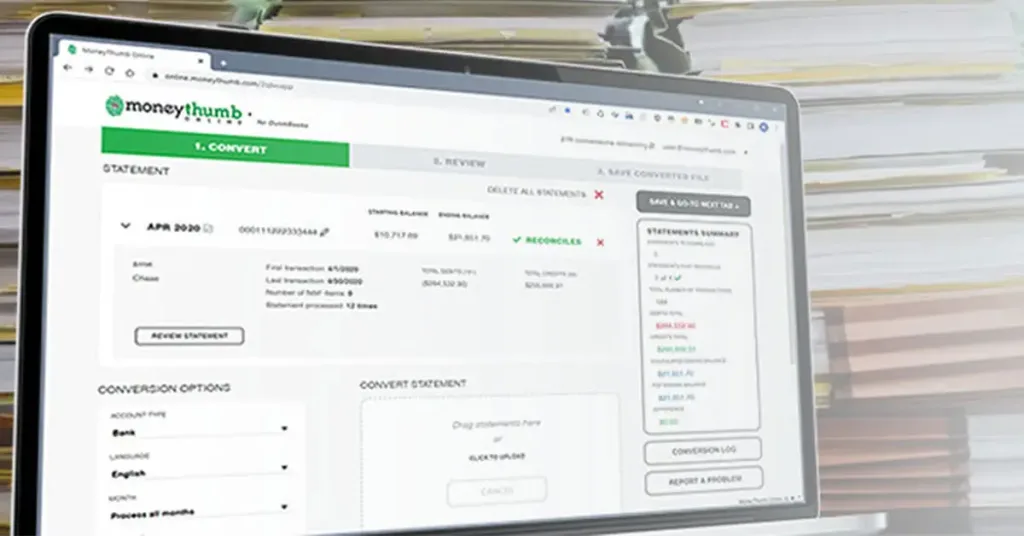
Automated extraction converts PDF statements into structured financial data that underwriting systems can analyze consistently.
Important fields include:
- Beginning balance
- Ending balance
- Daily balances
- Deposits
- Withdrawals
- Transaction dates
- Merchant names
- Account numbers
- Statement period
MoneyThumb automatically converts financial PDFs into standardized Excel, CSV, JSON, and structured data formats that integrate with underwriting systems.
Step 5: Standardize Merchant Names Across Statements
Merchant names often appear differently across banks.
For example:
| Original Description | Standardized Merchant |
| WALMART #2468 | Walmart |
| WM SUPERCENTER | Walmart |
| WAL-MART STORE | Walmart |
| WALMART.COM | Walmart |
Without normalization, underwriting software may treat these as four different merchants.
MoneyThumb standardizes extracted financial data so recurring expenses, subscriptions, payroll deposits, and merchant activity become easier to analyze across multiple statements.
This improves:
- Cash-flow analysis
- Expense categorization
- Business spending review
- Financial trend analysis
Step 6: Detect Abnormal Deposit Patterns Automatically
One of the strongest indicators of fraud is unusual deposit behavior.
Rather than reviewing dozens of pages manually, lenders can automatically analyze deposits across multiple statements.
Useful detection methods include:
Large One-Time Deposits
A sudden deposit far above historical averages may indicate temporary balance inflation.
Circular Deposits
Funds repeatedly enter and leave an account within short periods.
Payroll Inconsistencies
Income dates, employer names, or amounts change unexpectedly.
Structured Deposits
Many small deposits combine to create the appearance of stable income.
Missing Historical Patterns
Recurring deposits suddenly disappear before the statement period.
Duplicate Transactions
Repeated deposits with identical values may suggest manipulation.
Automated pattern recognition helps underwriters prioritize applications needing closer review.
Step 7: Compare Multiple Statements Together
Fraud often becomes visible only when several months are analyzed together.
Instead of validating each statement independently, lenders should compare trends across three to twelve months.
Review:
- Average monthly income
- Deposit consistency
- Spending trends
- NSF frequency
- Balance stability
- Cash-flow volatility
- Loan repayments
- Merchant consistency
Trend analysis frequently identifies manipulation that single-statement reviews miss.
Step 8: Surface Document Inconsistencies for Underwriters
Underwriters should spend time evaluating risk not searching for formatting errors.
Modern validation software highlights inconsistencies before the file reaches manual review.
Examples include:
- Missing pages
- Duplicate pages
- Different fonts
- Balance mismatches
- Metadata conflicts
- Editing traces
- Transaction irregularities
- Missing statement dates
MoneyThumb flags these inconsistencies early, allowing underwriting teams to focus on higher-value credit decisions rather than manual document inspection.
How MoneyThumb Helps Detect Bank Statement Fraud
MoneyThumb combines document analysis, PDF authentication, financial data extraction, and transaction normalization into a workflow designed for lenders.
Its capabilities include:
- PDF validation
- AI-assisted alteration detection
- Thumbprint® authentication
- Watermark integrity checks
- Automatic financial data extraction
- Merchant normalization
- Excel, CSV, JSON exports
- Multi-bank statement support
- Cash-flow analysis
- Integration with underwriting workflows
Together, these features help reduce manual review time while improving fraud detection.
Best Practices for Building a Secure Bank Statement Validation Workflow
Technology works best when paired with consistent underwriting procedures.
Organizations should establish a validation workflow that checks every uploaded statement before it reaches credit review. This reduces reliance on manual inspection and creates a repeatable process across lending teams.
A strong validation program should:
- Validate every uploaded PDF
- Analyze document metadata
- Detect synthetic or AI-generated files
- Verify watermark integrity
- Normalize merchant names
- Compare multiple statement periods
- Flag abnormal deposit patterns
- Standardize extracted financial data
- Route high-risk files for manual review
- Maintain audit logs for compliance
Manual Review vs Automated PDF Validation
| Feature | Manual Review | Automated Validation |
| Processing speed | Slow | Seconds |
| Metadata inspection | Limited | Comprehensive |
| AI document detection | No | Yes |
| Watermark verification | Difficult | Automated |
| Deposit analysis | Manual | Automatic |
| Merchant normalization | Manual | Automatic |
| Multiple statement comparison | Time-consuming | Built in |
| Fraud detection consistency | Varies by reviewer | Consistent |
Frequently Asked Questions
How can lenders automatically detect abnormal deposit patterns?
Automated bank statement analysis software reviews multiple months of transaction history to identify unusual deposits, inconsistent payroll, duplicate credits, structured deposits, and sudden balance increases that may indicate fraud.
Can MoneyThumb detect attempts to remove or alter a watermark?
Yes. MoneyThumb's Thumbprint® authentication technology can detect whether a protected PDF has been altered, including attempts to modify or remove applied authentication markers.
Can MoneyThumb identify AI-generated bank statement PDFs?
MoneyThumb includes AI-assisted PDF analysis that helps identify files showing characteristics commonly associated with synthetic or AI-generated document manipulation, giving lenders another layer of fraud screening.
Can MoneyThumb help underwriters identify inconsistencies faster?
Yes. MoneyThumb automatically extracts financial data, validates PDF integrity, highlights suspicious document characteristics, and flags inconsistencies so underwriters can focus on credit decisions instead of manual document review.
How does merchant standardization improve underwriting?
Standardizing merchant names groups similar transactions under a consistent label, making recurring expenses, payroll deposits, subscriptions, and spending patterns easier to analyze across different bank statement formats.
Conclusion
Bank statement fraud continues to evolve, making traditional visual inspections increasingly unreliable. Lenders need validation processes that examine both the document itself and the financial information it contains. By combining PDF integrity checks, AI-assisted alteration detection, watermark verification, automated transaction extraction, merchant normalization, and behavioral analysis, underwriting teams can identify suspicious applications earlier and make faster, more consistent lending decisions.
MoneyThumb supports this approach by bringing document authentication, structured financial data extraction, and fraud detection into a single workflow. As loan volumes grow and fraud techniques become more advanced, automated PDF validation is no longer simply a productivity improvement it is an important safeguard for reducing risk while maintaining efficient underwriting.
References
- https://www.moneythumb.com/
- https://www.moneythumb.com/pdf-data-extraction/
- https://www.moneythumb.com/thumbprint/
- https://algodocs.com/extract-data-from-bank-statement/
- https://arya.ai/apex-apis/bank-statement-extraction
- https://authbridge.com/blog/bank-statement-analysis-for-digital-lenders/
- https://aws.amazon.com/marketplace/pp/prodview-swdgle2m3eslm
- https://azapi.ai/bank-statement-analysis-software/
- https://www.consumerfinance.gov/
- https://www.nist.gov/















Add comment