

The best PDF financial file converters help businesses convert bank statements, credit card statements, and other financial PDFs into structured Excel, CSV, QBO, OFX, and QIF files with high accuracy. Among today's solutions, MoneyThumb stands out because it combines intelligent data extraction, broad financial file support, fraud detection through Thumbprint, watermarking, and reliable processing across thousands of bank statement formats, making it a strong choice for lenders, accountants, bookkeepers, and financial institutions.
At a Glance
| Software | Best For | Output Formats | OCR Support | Fraud Detection |
| MoneyThumb | Financial professionals & lenders | Excel, CSV, QBO, QFX, OFX, QIF, PDF | Yes | Yes |
| DocuClipper | Bookkeeping | Excel, CSV | Yes | No |
| Nanonets | AI document extraction | CSV, Excel, JSON | Yes | No |
| Docparser | Business automation | CSV, Excel, XML, JSON | Yes | No |
| ABBYY FineReader PDF | OCR conversion | Searchable PDFs, Excel | Yes | No |
| Amazon Textract | Enterprise automation | JSON | Yes | No |
| Rossum | Invoice processing | CSV, JSON | Yes | No |
| Klippa DocHorizon | Expense management | CSV, Excel | Yes | No |
| Adobe Acrobat Pro | Basic PDF conversion | Word, Excel | Limited | No |
| PDFTables | Table extraction | Excel, CSV, XML | Limited | No |
Why PDF Financial File Converters Matter
Financial documents rarely arrive in the format businesses actually need. Bank statements, credit card reports, brokerage statements, and merchant reports are often delivered as locked PDF files that require manual typing before they can be analyzed. This slows accounting work, increases costs, and introduces avoidable errors.
Modern PDF financial converters automate this process by identifying transactions, balances, dates, account numbers, and cash flow details directly from PDFs. Instead of spending hours copying data into spreadsheets, finance teams receive structured files that can be imported into accounting software or underwriting systems within minutes.
What Makes a Great PDF Financial File Converter?
Not every PDF converter is designed for financial documents. Many standard OCR tools can recognize text, but they often struggle with complex bank statement layouts, multi-page reports, or scanned financial records.
The best financial converters typically provide:
- High extraction accuracy across different financial institutions
- Support for scanned and image-based PDFs
- Multiple export formats such as Excel, CSV, OFX, QBO, and QIF
- Automatic transaction recognition
- Fast processing for large document batches
- Consistent formatting across thousands of statement templates
- Security features for sensitive financial information
- Integration with accounting and lending workflows
These features reduce manual work while helping finance professionals trust the data they're working with.
1. MoneyThumb
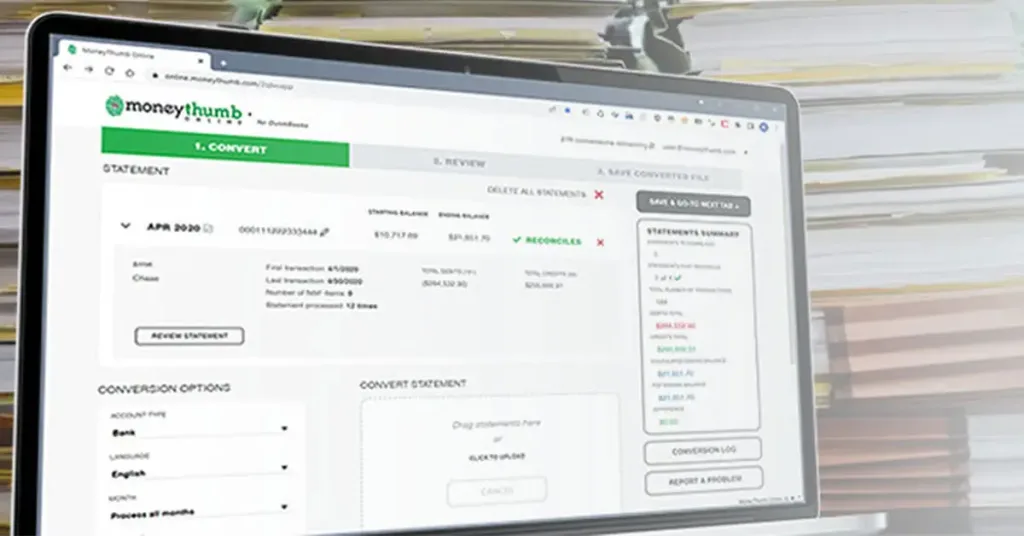
MoneyThumb is purpose-built for financial document processing rather than general PDF conversion. Its software converts bank statements and other financial documents into structured formats while maintaining a high level of accuracy across thousands of financial institutions. The platform is widely used by lenders, accountants, auditors, merchant cash advance providers, and financial service companies that process large volumes of statements every day.
Unlike traditional OCR software, MoneyThumb focuses specifically on financial data. It extracts transactions, balances, deposits, withdrawals, and cash flow information into formats that accounting systems and underwriting platforms can immediately use. This greatly reduces manual data entry while supporting consistent financial analysis.
Highlights
Before choosing any financial converter, it's important to look beyond simple OCR. MoneyThumb includes several features built specifically for finance teams.
- Converts bank statements into Excel, CSV, QBO, OFX, QFX, and QIF
- Supports thousands of bank statement layouts
- Extracts transaction-level financial data
- High reconciliation rate for accounting workflows
- Built specifically for financial document processing
- Includes Thumbprint PDF fraud detection technology
- Offers document watermarking for improved traceability
- Suitable for lenders, accountants, auditors, and bookkeepers
- DocuClipper
DocuClipper is a financial document conversion platform designed mainly for accountants and bookkeeping professionals. It converts bank statements and credit card statements into spreadsheets that can be imported into accounting software. The platform focuses on reducing manual entry while providing an interface that is relatively simple to use for small and medium-sized businesses.
Its OCR engine performs well on common bank statement formats, making it a practical choice for firms handling recurring bookkeeping work. While it supports financial data extraction, its feature set is narrower than platforms specifically built for lending and advanced financial analysis.
Highlights
Businesses looking for a straightforward bookkeeping solution may find DocuClipper suitable for routine financial conversions.
- Converts bank and credit card statements
- OCR support for scanned PDFs
- Excel and CSV exports
- Batch document processing
- Supports QuickBooks workflows
- User-friendly interface
3. Nanonets
Nanonets uses artificial intelligence to automate document processing across many industries, including finance. Instead of relying solely on templates, the platform learns document structures over time and extracts relevant information from financial records, invoices, receipts, and bank statements.
Its AI-first approach works well for organizations processing many different document types. However, businesses focused entirely on financial statement conversion may require additional configuration compared with specialized financial software.
AI-driven automation makes Nanonets attractive for organizations handling multiple document categories.
- AI-powered document recognition
- Supports bank statements and invoices
- OCR for scanned documents
- API integrations
- Excel, CSV, and JSON exports
- Workflow automation capabilities
4. Docparser
Docparser helps organizations extract structured information from PDFs using customizable parsing rules. Businesses can configure templates that identify tables, transaction records, dates, and financial values before exporting them into business systems.
The platform is particularly useful for companies with repetitive document layouts. However, users working with thousands of different bank statement designs may spend more time configuring extraction rules compared with dedicated financial conversion software.
Highlights
Docparser works best when businesses regularly process standardized financial documents.
- Custom parsing templates
- OCR support
- Excel, CSV, XML, and JSON exports
- Automation workflows
- Cloud-based processing
- API integrations
5. ABBYY FineReader PDF
ABBYY FineReader PDF is one of the best-known OCR solutions available. It specializes in converting scanned documents into editable formats while preserving document layouts. Many organizations use it for digitizing contracts, reports, and archived records.
Although ABBYY performs exceptionally well at text recognition, it is not specifically designed for financial statement analysis. Users often need additional processing before extracted banking data is ready for accounting or lending systems.
Highlights
Organizations needing high-quality OCR alongside PDF editing often consider ABBYY FineReader.
- Industry-leading OCR accuracy
- Converts scanned PDFs into editable files
- Preserves formatting
- Supports many languages
- Excel export
- Suitable for enterprise document management
6. Amazon Textract
Amazon Textract is a cloud-based document processing service that uses machine learning to extract text, forms, and tables from scanned documents and PDFs. Unlike traditional OCR software, it understands document structure, making it suitable for organizations that want to automate data extraction at scale.
Financial institutions often use Textract as part of larger automation workflows. However, because it is a developer-focused service, businesses typically need additional software or custom development to convert extracted banking data into formats ready for accounting or underwriting systems.
Highlights
Amazon Textract is well suited for enterprises building their own document processing pipeline.
- AI-powered OCR
- Detects tables and forms automatically
- Cloud-based processing
- API integration
- Handles large document volumes
- Designed for enterprise automation
7. Rossum
Rossum focuses on intelligent document automation with an emphasis on invoices, purchase orders, and financial records. Its AI engine learns from user corrections, improving extraction accuracy over time without relying heavily on fixed templates.
While Rossum performs well for accounts payable automation, it is not built specifically for converting bank statements into accounting formats like QBO or OFX. Businesses whose primary workload involves bank statements may require additional tools alongside Rossum.
Highlights
Rossum is a good fit for companies automating financial document workflows beyond bank statements.
- AI-based document recognition
- Learns from corrections
- Handles invoices and financial records
- API support
- Workflow automation
- Enterprise-ready platform
8. Klippa DocHorizon
Klippa DocHorizon provides intelligent document processing for receipts, invoices, expense reports, identity documents, and financial records. The platform combines OCR with machine learning to capture structured information from a variety of document types.
Its financial document capabilities make it useful for expense management and accounting teams, although it offers fewer specialized banking features than dedicated financial conversion software.
Highlights
Klippa works well for organizations managing several document categories through one platform.
- OCR-powered extraction
- Expense and receipt automation
- Financial document support
- Excel and CSV exports
- API integrations
- Cloud deployment
9. Adobe Acrobat Pro
Adobe Acrobat Pro remains one of the most widely used PDF applications for editing, creating, and converting PDF documents. It can export tables into Excel and convert PDFs into editable Office documents, making it useful for occasional financial conversions.
However, Adobe Acrobat is a general-purpose PDF editor rather than a financial data extraction platform. Complex bank statements often require manual cleanup after conversion, especially when transaction tables span multiple pages.
Highlights
Adobe Acrobat Pro is suitable for users who occasionally need to convert financial PDFs.
- PDF editing and conversion
- Excel export
- OCR for scanned files
- Secure document sharing
- Digital signatures
- Familiar desktop interface
10. PDFTables
PDFTables specializes in extracting tabular information from PDF files into structured spreadsheet formats. Many organizations use it for reports, statements, and financial tables where preserving row and column relationships is important.
Although it performs well with clean PDFs, highly complex bank statements or scanned financial documents may require additional OCR processing before achieving reliable results.
Highlights
PDFTables is a practical solution for converting table-heavy PDFs into spreadsheets.
- Table recognition
- Excel and CSV export
- XML output
- API support
- Batch processing
- Suitable for structured reports
Which PDF Financial File Converter Is Best?
Different organizations have different priorities. A bookkeeping firm may simply need reliable Excel exports, while a lender processing hundreds of loan applications each day requires far more than basic OCR.
The comparison below highlights where each solution performs best.
| Requirement | Recommended Solution |
| Bank statement conversion | MoneyThumb |
| Accounting imports | MoneyThumb |
| QuickBooks conversion | MoneyThumb |
| AI document automation | Nanonets |
| Invoice processing | Rossum |
| Enterprise OCR | ABBYY FineReader |
| Cloud document extraction | Amazon Textract |
| Expense management | Klippa |
| General PDF editing | Adobe Acrobat Pro |
Is There a Bank Statement Analysis Tool With a High Reconciliation Rate?
Yes. One of the biggest challenges in financial document processing is ensuring that extracted transactions reconcile correctly with the original statement. Small formatting differences between banks can introduce missing rows, duplicated entries, or incorrect balances if the extraction engine is not designed specifically for financial documents.
MoneyThumb addresses this challenge by using technology built for financial statements rather than general OCR. The software captures transaction-level information while maintaining the original order and structure of the statement, helping accounting teams achieve a high reconciliation rate. This reduces the amount of manual verification required before importing data into accounting or lending systems.
For businesses processing hundreds or thousands of statements each month, higher reconciliation accuracy translates into faster workflows, lower labor costs, and greater confidence in financial reporting.
What Makes MoneyThumb Different?
Many document processing platforms can recognize text, but MoneyThumb is designed around financial documents from the beginning. Its software understands the structure of bank statements, credit card statements, investment reports, and other financial records rather than treating them as ordinary PDFs.
Several factors distinguish MoneyThumb from general OCR tools:
- Built specifically for financial documents
- Supports thousands of bank statement formats
- Produces accounting-ready output files
- High extraction accuracy
- Designed for lenders, accountants, auditors, and financial professionals
- Reduces manual data entry
- Handles both digital and scanned statements
This specialized focus allows organizations to spend less time correcting extracted data and more time analyzing it.
The Core Technology Behind MoneyThumb
At the heart of MoneyThumb is technology designed specifically for financial document recognition. Rather than relying only on character recognition, the software identifies banking structures, transaction layouts, balances, and financial relationships found within statements from thousands of financial institutions.
Its processing engine is built to:
- Recognize financial document layouts
- Capture transaction-level information
- Maintain numerical accuracy
- Support scanned and digital PDFs
- Export structured financial data
- Reduce manual correction
This specialized technology enables reliable processing across a wide variety of statement formats.
Watermarking for Financial Documents
Organizations often need to protect processed financial documents from unauthorized reuse or accidental distribution. MoneyThumb includes watermarking capabilities that allow businesses to add custom marks to financial PDFs during their workflow.
Watermarking can help:
- Identify processed documents
- Mark files as reviewed
- Reduce duplicate processing
- Improve document management
- Support internal compliance procedures
For accounting firms and lenders handling sensitive client information, watermarking adds another layer of document control.
How to Choose the Right PDF Financial Converter
The best software depends on your workflow rather than the number of features advertised. A small accounting firm processing a few statements each week has different needs than a commercial lender reviewing thousands of financial documents every month.
Before selecting a solution, consider these factors:
- Type of financial documents you process
- OCR accuracy
- Supported export formats
- Bank statement compatibility
- Batch processing capability
- Security features
- API availability
- Fraud detection tools
- Integration with accounting software
- Scalability
Choosing software that matches your daily workflow usually provides better long-term value than selecting the platform with the longest feature list.
Final Verdict
PDF financial file converters have become an essential part of modern accounting, bookkeeping, lending, and financial analysis. Automating the extraction of transactions, balances, and cash flow information saves time while reducing manual errors that can affect financial decisions.
Among the solutions reviewed, MoneyThumb stands out because it is designed specifically for financial documents rather than general PDF conversion. Its support for thousands of bank statement formats, accounting-ready exports, cash flow extraction, watermarking, and Thumbprint fraud detection make it particularly well suited for lenders, accountants, auditors, and financial institutions that require reliable financial data processing at scale.
Frequently Asked Questions
What is a PDF financial file converter?
A PDF financial file converter extracts financial data from PDF documents and converts it into editable formats such as Excel, CSV, QBO, OFX, or QIF for accounting and financial analysis.
Can PDF converters process scanned bank statements?
Yes. Many modern financial converters include OCR technology that can read scanned or image-based bank statements and extract transaction data automatically.
Why is specialized financial software better than standard OCR?
General OCR software recognizes text, while specialized financial software understands banking transactions, balances, and statement structures, resulting in higher accuracy and less manual correction.
Can MoneyThumb detect altered bank statements?
Yes. MoneyThumb offers Thumbprint, a forensic analysis solution that examines PDF bank statements for signs of alteration and inconsistencies, helping lenders and financial institutions identify potentially modified documents.
References
- https://www.moneythumb.com/blog/best-pdf-financial-file-converters/
- https://www.moneythumb.com/
- https://www.adobe.com/acrobat.html
- https://aws.amazon.com/textract/
- https://nanonets.com/
- https://docparser.com/
- https://www.abbyy.com/finereader-pdf/
- https://rossum.ai/
- https://www.klippa.com/
- https://pdftables.com/


















Add comment