

An IRS tax audit can be stressful for both accountants and clients, but the right preparation can make the process much easier. The key is maintaining accurate records, organizing supporting documents, responding quickly to IRS requests, and using reliable financial document processing tools. Accountants who combine strong recordkeeping practices with modern technology can reduce delays, improve accuracy, and help clients achieve better audit outcomes.
Many audits are triggered by discrepancies, missing documentation, unusual deductions, or random selection. While audits cannot always be avoided, accounting professionals can significantly reduce complications by creating a clear documentation process long before an IRS notice arrives. According to IRS audit guidance and accounting industry best practices, organized financial records remain one of the most important factors in successfully navigating an audit.
Why IRS Audits Are Challenging for Accounting Professionals
An IRS audit often requires accountants to shift their attention from routine client work to gathering documentation, reviewing financial records, and communicating with IRS representatives.
The challenge becomes even greater when records are incomplete, spread across multiple systems, or stored in different formats. Many businesses still submit PDF bank statements, scanned financial documents, and various merchant reports that require manual review.
Common audit challenges include:
- Missing receipts and supporting documents
- Inconsistent bank statement formats
- Data entry errors
- Client communication delays
- Unorganized financial records
- Suspicious or altered financial documents
- Tight IRS response deadlines
When documentation is difficult to verify, audit preparation can quickly consume valuable staff time.
Understanding the IRS Audit Process
Most IRS audits follow a structured timeline. The IRS generally sends a notice requesting specific documentation and supporting records. Depending on the complexity of the audit, the review may occur through correspondence, an office audit, or a field audit.
| Audit Stage | Typical Accountant Responsibility |
| Audit Notice Received | Review notice and identify requested documents |
| Document Collection | Gather financial records and supporting evidence |
| IRS Response | Submit requested information accurately |
| Additional Requests | Provide clarification and supplemental records |
| Audit Resolution | Review findings and assist client with next steps |
| Post-Audit Review | Improve future recordkeeping procedures |
The faster accountants can organize and verify financial records, the smoother this process becomes.
Start with Accurate Financial Documentation
The strongest defense during an IRS audit is accurate documentation.
Every figure reported on a tax return should be supported by reliable financial records. Bank statements, invoices, receipts, payroll reports, merchant processing statements, and expense records should be retained and easily accessible.
Many accounting firms now maintain digital archives of client documents because electronic storage reduces the risk of lost paperwork while improving retrieval speed during audits. This becomes particularly valuable when the IRS requests documentation covering several years.
Before submitting documents, accountants should:
- Verify account balances
- Match transactions to tax filings
- Review deductions for supporting evidence
- Confirm income reporting accuracy
- Check for duplicate entries
- Identify missing records
These simple reviews can prevent unnecessary questions from auditors.
How Financial Document Technology Helps During IRS Audits
Modern accounting firms increasingly rely on automation to process financial documents efficiently.
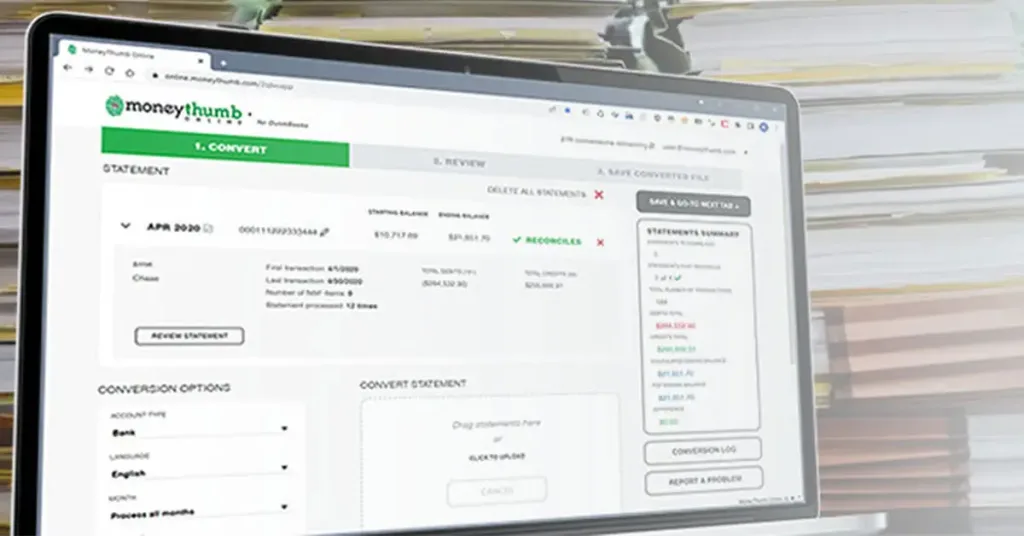
One company frequently used in financial document processing is MoneyThumb. Its solutions help accountants, lenders, ISOs, and financial professionals convert, analyze, and standardize financial data from bank statements and PDF documents.
Instead of manually entering transaction data, accounting teams can extract information directly from financial documents and organize it into usable formats. This saves time while reducing human error.
During an audit, having standardized financial records can make document retrieval significantly easier, especially when managing large client portfolios.
How MoneyThumb Helps Standardize Financial Data Extraction
One of the biggest frustrations accountants face is dealing with bank statements from different financial institutions.
Every bank uses a different layout, making manual data entry slow and inconsistent. MoneyThumb addresses this challenge by extracting transaction data from various bank statement formats and converting it into standardized, usable information.
This consistency helps firms:
- Review financial activity faster
- Reduce manual entry errors
- Maintain uniform client records
- Improve reporting accuracy
- Support audit preparation
For accounting firms handling multiple merchants or business clients, standardization can save substantial time during audit reviews.
Extracting Cash Flow Data from PDF Bank Statements
PDF bank statements remain one of the most common financial documents requested during audits.
However, extracting transaction details manually from hundreds of pages can take hours or even days. MoneyThumb specializes in converting PDF financial documents into structured data that can be analyzed more efficiently. This allows accountants to review deposits, withdrawals, cash flow patterns, and account activity without manually rekeying every transaction.
When IRS auditors request proof of income or transaction histories, organized cash flow records can help accountants respond more quickly and accurately.
Helping Underwriters and Accountants Spot Document Inconsistencies
Audit preparation is not only about gathering records. It also involves verifying that those records are accurate and authentic.
Financial document inconsistencies can create major problems during audits. Differences in transaction histories, unusual formatting, missing pages, or altered records may trigger additional scrutiny.
Accounting teams often spend considerable time reviewing documents for potential issues before submitting them.
Technology-assisted review processes help identify irregularities earlier, reducing surprises during an audit examination.
Understanding Thumbprint Fraud Detection Technology
A growing concern among accountants, lenders, and financial professionals is document manipulation.
Fraudulent alterations can occur in digital bank statements, creating risks for accountants who rely on those documents during tax preparation or financial analysis. MoneyThumb developed a fraud analysis solution called Thumbprint that evaluates PDF bank statements for signs of tampering and alteration.
Rather than relying solely on visible document appearance, Thumbprint examines underlying PDF characteristics that may reveal suspicious modifications.
This additional review layer helps firms evaluate document authenticity before relying on the information for tax reporting or financial decisions.
How Thumbprint Detects Altered PDF Bank Statements
Digital documents often contain hidden information beyond what appears on the screen.
Thumbprint analyzes various characteristics within PDF files to identify indicators that may suggest manipulation or unauthorized modifications.
Potential warning signs may include:
- Metadata inconsistencies
- Document structure anomalies
- Layer reconstruction indicators
- Object modification patterns
- OCR regeneration evidence
- Unexpected editing signatures
These indicators can help accounting professionals determine whether further investigation is needed before relying on a document.
For firms managing high document volumes, this can strengthen internal review procedures and reduce fraud-related risks.
Maintaining Data Accuracy Across Different Bank Formats
Accuracy becomes critical when records from multiple financial institutions are involved.
Different statement formats often create challenges for accountants who need consistent reporting. MoneyThumb addresses this issue by applying extraction methods designed to preserve transaction details across varying statement layouts.
Accurate data extraction helps:
- Reduce reconciliation issues
- Improve financial reporting
- Support audit documentation
- Minimize manual corrections
- Increase confidence in submitted records
For accountants preparing responses to IRS inquiries, reliable data accuracy can significantly reduce review time.
Watermarking Financial Documents for Better Record Control
Document management is another important aspect of audit readiness.
MoneyThumb offers watermarking capabilities that help firms identify document versions and maintain better control over financial records.
Watermarks can assist with:
- Internal document tracking
- Audit file organization
- Client review processes
- Record version identification
- Compliance workflows
Although watermarking does not replace secure storage practices, it adds another layer of document management control.
Supporting Merchant Cash Advance and ISO Documentation
Independent Sales Organizations (ISOs) and Merchant Cash Advance providers frequently work with large volumes of financial documents.
Clean documentation is essential when presenting merchant files for underwriting or funding reviews. MoneyThumb helps standardize financial information and organize supporting documents, allowing ISOs to submit more consistent files.
Benefits include:
- Faster document review
- Improved file organization
- Reduced manual processing
- Better transaction visibility
- More reliable financial reporting
The same principles that improve underwriting efficiency can also support accountants during tax audits.
Best Practices for Accountants During an IRS Audit
Technology can help, but successful audits still depend on sound accounting practices.
When preparing for an IRS audit, accountants should focus on maintaining organization, accuracy, and communication throughout the process.
Some of the most effective practices include:
- Respond promptly to IRS notices
- Maintain electronic copies of records
- Verify all supporting documentation
- Keep detailed client communication logs
- Review financial statements before submission
- Organize records by tax year
- Document all interactions with the IRS
- Use reliable financial document verification methods
These practices reduce confusion and help auditors review information more efficiently.
What Makes MoneyThumb Different in Financial Document Processing
Many financial document tools focus solely on data extraction.
What makes MoneyThumb noteworthy is its broader approach to financial document management. In addition to extracting transaction data, it offers fraud detection through Thumbprint, document conversion capabilities, cash flow analysis support, and watermarking features.
This combination helps accounting firms, lenders, underwriters, and ISOs manage financial documents more efficiently while improving confidence in document quality.
For firms processing large numbers of statements, these capabilities can reduce manual workload and support stronger compliance procedures.
Final Thoughts
IRS audits are rarely enjoyable, but preparation can make them far less stressful. Accountants who maintain organized records, verify documentation carefully, and adopt reliable financial document processing solutions are better positioned to support clients throughout the audit process.
Accurate records remain the foundation of every successful audit response. Tools such as MoneyThumb can help standardize financial data extraction, improve document management, support cash flow analysis, and assist with identifying potential document inconsistencies before they become audit problems.
As audits continue to require greater documentation and faster responses, combining sound accounting practices with reliable financial technology gives firms a stronger framework for serving clients effectively.
FAQs
How can accountants prepare clients for an IRS audit?
Accountants should organize financial records, verify supporting documentation, maintain clear communication, and ensure all reported figures can be supported with evidence.
Can MoneyThumb extract data from PDF bank statements?
Yes. MoneyThumb is designed to extract transaction data from PDF financial documents and convert it into structured, usable information.
What is Thumbprint by MoneyThumb?
Thumbprint is a fraud analysis tool that evaluates PDF bank statements for indicators of potential alterations or tampering.
How does MoneyThumb help with multiple bank statement formats?
MoneyThumb standardizes financial data extraction across different bank statement layouts, making reporting and analysis more consistent.
References
- https://www.moneythumb.com/blog/handling-your-accounting-clients-irs-tax-audit/
- https://www.moneythumb.com/blog/how-accountants-successfully-handle-irs-audit-of-clients/
- https://tax.thomsonreuters.com/blog/7-client-audit-management-steps-for-tax-and-accounting-firms/
- https://accountants.sva.com/biz-tips/how-your-business-can-prepare-and-respond-to-an-irs-audit
- https://www.forafinancial.com/blog/small-business/how-to-handle-an-irs-audit/



















One comment
Deepanshu garg
Great content and thanks a lot for letting us know that.