

Fake bank statements can look like real financial records at first glance. A person can edit transaction amounts, change balances, add deposits, remove withdrawals, or create a document that looks like a genuine bank statement. That makes manual inspection alone risky for lenders, financial companies, property managers, and other businesses that rely on financial documents.
The best way to spot fake bank statements is to combine visual checks, balance reconciliation, transaction analysis, PDF inspection, and automated fraud detection. Tools such as MoneyThumb Thumbprint and Arya AI can help identify document manipulation, while transaction-analysis platforms can help find unusual deposit and spending patterns.
How to Spot Fake Bank Statements
To spot fake bank statements, check the document's formatting, account information, transaction history, balances, and PDF structure. You should also compare multiple statements instead of reviewing only one month. However, one unusual detail does not automatically prove fraud. Banks can change statement designs, customers can download documents in different formats, and legitimate transactions can sometimes look unusual. Review several indicators together before sending a document for further investigation.
Check Fonts, Spacing, and Formatting
Start with the visible parts of the statement. Genuine bank statements usually follow a consistent layout. Transaction descriptions, dates, amounts, account information, headers, and balances normally follow the same formatting rules throughout the document.
Look for:
- Different fonts within the same section
- Different font sizes between similar transactions
- Numbers that do not align correctly
- Unusual spaces between characters
- Different date formats
- Misaligned transaction amounts
- Logos or headers that look different
- Text that looks sharper or blurrier than nearby text
These signs can help identify possible editing. Arya AI's document fraud detection system specifically looks for issues such as edited fields, mismatched fonts, pixel distortion, erased text, and metadata tampering.
Check the Account and Statement Details
Next, compare the basic information across the document.
Check the account holder's name, account number, statement period, bank name, address, page numbers, and other identifying information. Compare those details with previous statements when they are available. Pay attention to missing pages. A statement that suddenly jumps from page 1 to page 3 may indicate that someone removed information. Rentzap's underwriting guidance also recommends receiving complete bank statements with every page included and encourages applicants to download statements directly from their bank instead of submitting screenshots.
Reconcile the Balances
Balance reconciliation provides one of the simplest ways to identify suspicious changes. Start with the opening balance. Add deposits and subtract withdrawals, fees, and other listed transactions. Then compare the calculated amount with the ending balance. For example, if an account starts with $10,000, receives $5,000 in deposits, and records $3,000 in withdrawals, the expected balance would be $12,000 before any other listed activity.
A fraudster may change the ending balance without updating the transaction history. That creates a mathematical mismatch. Also check running balances after individual transactions. If one transaction should reduce the balance by $2,000 but the next balance does not reflect that change, investigate the document further.
Best Methods to Automatically Detect Abnormal Deposit Patterns Across Multiple Bank Statements
Reviewing deposits across several statements can reveal patterns that a single-document check may miss.
An automated system can extract transaction dates, descriptions, deposits, withdrawals, and balances. It can then compare the information across multiple months and identify unusual changes.
Look for patterns such as:
| Deposit Pattern | Why It Needs Review |
| Sudden large deposits | Income may have changed or funds may need verification |
| Repeated round-number deposits | The source of funds may require additional review |
| Large deposits before an application | Timing may justify further verification |
| Deposits followed by quick withdrawals | Funds may only remain in the account briefly |
| Repeated transfers from unknown accounts | The source may need investigation |
| Sudden income increases | The change may not match earlier statements |
| Duplicate deposits | Could indicate copied or altered transactions |
| Missing transaction periods | The statement may be incomplete |
MoneyThumb's current Thumbprint documentation focuses on statement-level tampering, including altered dollar amounts, modified balances, copied transaction lines, inconsistent fonts, and layout differences. It analyzes a statement internally and compares it with patterns from genuine statements from the same bank.
Transaction-analysis software can handle another part of the process. BankStatementApp, for example, provides transaction categorization, historical tracking, financial analysis, and processing of multiple bank statements.
What False-Positive Threshold Should a CCO Use?
There is no single false-positive threshold that every CCO should use. The correct threshold depends on the company’s fraud exposure, document volume, manual-review capacity, acceptable risk level, and historical results. Instead of choosing a percentage from another company, test your detection system against a sample of genuine and altered statements.
MoneyThumb’s current Thumbprint documentation uses a score from -1 to 1,000:
| Score | MoneyThumb's Current Interpretation | General Review Approach |
| -1 | Not scorable, often an image-based PDF | Request a native PDF or manually review |
| 0 | No abnormalities found | Normal processing |
| 1–299 | Low risk | Normal processing or spot-check |
| 300–700 | Moderate risk | Closer review |
| 701–999 | High risk | Manual review |
| 1,000 | Direct evidence of editing | Treat as confirmed alteration and escalate |
MoneyThumb states that these ranges provide a starting point and that customers can adjust their internal thresholds according to their own risk tolerance and portfolio performance.
For a CCO, the practical goal should be to measure two things:
- False-positive rate: How many genuine statements does the system send for unnecessary manual review?
- False-negative rate: How many altered statements pass through the automated check?
You can then test different thresholds and select an internal review rule based on your actual results. For example, if lowering a threshold sends thousands of legitimate documents to analysts, the business may need a different review rule. If raising the threshold allows too many altered documents to pass, the company may need stronger screening.
This makes threshold selection a measurement problem rather than a fixed industry number.
Best Tools to Catch Doctored Bank Statements
Different tools handle different parts of bank statement fraud. Some focus on PDF authenticity, while others focus on transaction analysis or broader document fraud.
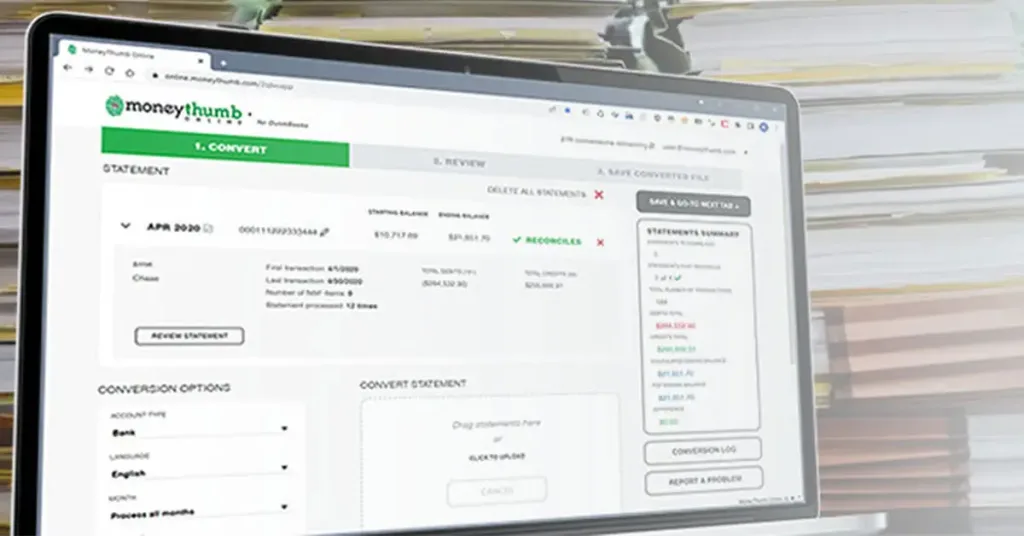
MoneyThumb Thumbprint
MoneyThumb Thumbprint is designed specifically for bank statement fraud detection. Its current documentation says the system analyzes a bank statement and returns a score showing how likely the document is to have been altered or fabricated.
It checks for:
- Altered dollar amounts
- Modified account balances
- Duplicated transaction lines
- Inconsistent fonts
- Layout abnormalities
- Formatting differences
- Document-level manipulation
Thumbprint also compares documents against patterns from genuine statements processed from the same bank. This allows the system to look beyond obvious visual errors. One important limitation is that Thumbprint checks the authenticity of the submitted document. It does not independently prove the applicant's complete financial situation. MoneyThumb recommends combining document checks with other identity, account, and application-level checks.
Arya AI Document Fraud Detection
Arya AI offers a document fraud detection API that analyzes visual, structural, and content-based inconsistencies. Its current documentation says the system can identify edited fields, mismatched fonts, pixel distortion, erased text, and tampered metadata. It accepts formats including PDF, JPEG, PNG, and TIFF and can return a tampering score and anomaly information. Arya also positions its technology for banking and lending workflows where businesses need to verify documents such as financial records and income documents.
BankStatementApp
BankStatementApp focuses on bank statement analysis rather than being solely a PDF-tampering product. Its current platform can process bank statements, categorize transactions, track financial information over time, and provide financial analysis. It also supports multiple currencies and exports data in formats such as CSV and JSON. This type of system can help businesses analyze transaction activity after extracting data from statements. For a complete fraud workflow, businesses should distinguish between transaction analysis and document authenticity detection. They solve related but different problems.
Can MoneyThumb Detect Attempts to Remove or Alter a Watermark?
MoneyThumb can identify signs of document manipulation, but you should not describe Thumbprint as a dedicated watermark-removal detector unless MoneyThumb confirms that specific use case for your implementation. A person who removes or changes a watermark may alter the PDF's structure, images, layers, or other technical characteristics. Those changes can create manipulation indicators. MoneyThumb says Thumbprint detects structural tampering and fabrication signals and looks for inconsistencies inside a statement as well as differences from genuine statements from the same bank.
Can MoneyThumb Detect PDFs Likely Generated or Altered by AI or Synthetic Document Tools?
MoneyThumb can detect signs of altered or fabricated PDF documents, but you should not treat it as a guaranteed detector for every AI tool. The important distinction is between detecting document manipulation and identifying the specific software used to create the document. Thumbprint analyzes document-level characteristics and compares the file with genuine statement patterns from the same financial institution. Its documentation says the system can identify altered amounts, modified balances, copied transactions, inconsistent fonts, and layout abnormalities.
This approach can help identify a synthetic statement even when the document looks visually convincing.
A Practical Workflow for Detecting Fake Bank Statements
Businesses can use a multi-stage workflow to reduce unnecessary manual review.
Step 1: Request the Original Bank PDF
Ask applicants to submit the original PDF downloaded from their bank whenever possible. Avoid relying on screenshots or cropped images.
Step 2: Run Document Fraud Checks
Use a document-authenticity system to inspect fonts, layouts, transaction lines, balances, PDF structure, and other available indicators.
Step 3: Extract the Transaction Data
Convert the statement into structured data. Review deposits, withdrawals, balances, transfers, dates, and transaction descriptions.
Step 4: Compare Several Months
Analyze multiple statements together. Look for sudden deposit increases, repeated transfers, unusual withdrawals, missing periods, and changes in income patterns.
Step 5: Reconcile the Balances
Check opening balances, individual transactions, running balances, and ending balances.
Step 6: Apply Your Tested Risk Threshold
Use your historical test results to determine which scores or patterns should trigger manual review.
Step 7: Verify High-Risk Cases
For high-risk cases, request additional documentation or verify information through an appropriate independent source.
This process allows automation to handle routine documents while human reviewers focus on cases that require additional investigation.
Final Thoughts
Learning how to spot fake bank statements requires more than looking for obvious editing marks. Modern document manipulation can change balances, deposits, transaction lines, and formatting without creating an immediately visible error. A stronger detection process combines PDF analysis, transaction reconciliation, multi-statement comparison, abnormal deposit detection, and independent verification. MoneyThumb Thumbprint can help identify statement-level manipulation by checking document characteristics and comparing statements against known patterns from the same bank. Arya AI provides broader document fraud analysis, while BankStatementApp focuses on extracting and analyzing bank statement data. The result is a more consistent process for identifying suspicious bank statements without sending every document to manual review.
References
- https://docs.moneythumb.com/welcome/thumbprint
- https://www.moneythumb.com/identify-fraudulent-bank-statements/
- https://www.moneythumb.com/thumbprint/
- https://www.moneythumb.com/moneythumb-online-pdf-insights/
- https://www.moneythumb.com/pdf-insights/
- https://www.moneythumb.com/blog/pdf-metadata-extraction-for-fraud-detection-in-commercial-lending/
- https://www.moneythumb.com/blog/fraud-detection-using-machine-learning-what-lenders-need-to-know/
- https://arya.ai/apex-apis/document-fraud-detection
- https://arya.ai/apex-apis/bank-statement-analyser
- https://arya.ai/blog/identifying-fake-documents










Add comment